
.png)
Description
Download Ardor Fitness – AI‑Powered Personal Training Tool for iOS
Overview
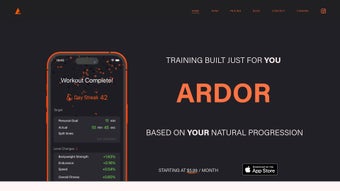
Ardor Fitness is a next‑generation, AI‑driven personal training platform that promises a truly individualized workout experience. Unlike generic fitness apps that push the same routine to every user, Ardor leverages machine learning to analyze your schedule, equipment inventory, energy levels, and personal fitness interests. The result is a dynamic plan that evolves daily, ensuring each session feels both challenging and achievable. With a built‑in progress tracker, daily self‑competition features, and a 90‑day free trial on iOS, Ardor Fitness positions itself as a versatile companion for anyone serious about leveling up their health journey. Whether you’re a busy professional juggling a packed calendar, a home‑gym enthusiast with limited equipment, or an athlete looking for precise intensity adjustments, Ardor’s adaptive engine predicts your capabilities for every workout, automatically tweaking volume, rest periods, and exercise selection. The app’s sleek UI, secure cloud sync, and regular updates make it a reliable, future‑proof solution that keeps your data safe while delivering fresh content. In short, Ardor Fitness combines the power of artificial intelligence with proven training principles to create a personalized fitness path that stays relevant, motivating, and secure.
Core Features & Benefits
- AI‑Generated Daily Plans: The algorithm builds a new workout each day based on your previous performance, current fatigue, and upcoming schedule.
- Equipment‑Aware Programming: Whether you have a full‑size home gym, a set of dumbbells, or just a mat, Ardor tailors exercises to match what’s available.
- Energy & Intensity Prediction: Using heart‑rate data (optional) and self‑reported energy scores, the app predicts optimal intensity to avoid overtraining.
- Progress Dashboard: Visual charts show strength gains, cardio improvements, and consistency trends over weeks and months.
- Daily Self‑Competition: Earn points for hitting personal bests, beating yesterday’s score, and sharing achievements with friends.
- Adaptive Rest Periods: Rest times shrink or expand automatically based on how quickly you recover between sets.
- Secure Cloud Sync: All workouts, metrics, and preferences are encrypted and stored in the cloud for seamless access across devices.
- 90‑Day Free Trial: Full access to premium AI features without any credit‑card commitment, giving you ample time to test the platform.
Beyond the headline features, Ardor Fitness integrates subtle benefits that often go unnoticed until you experience them. The AI engine learns your preferred training windows, so if you consistently work out at 6 p.m., the app will pre‑schedule sessions during that slot, reducing decision fatigue. It also respects periodization principles—cycling through hypertrophy, strength, and endurance phases—so you never plateau due to monotonous programming. For users concerned about data privacy, Ardor complies with GDPR and employs end‑to‑end encryption, meaning your biometric and performance data never leave your device in an unprotected state. Moreover, the community hub encourages friendly competition without the pressure of public leaderboards; you can challenge yourself privately or invite a select group of friends to a weekly “fit‑battle.” The combination of cutting‑edge AI, thoughtful UI design, and a clear focus on user safety makes Ardor Fitness a standout option in a crowded market of generic workout apps.
Installation & Usage Instructions
Getting started with Ardor Fitness is straightforward, even if you’re not a tech‑savvy user. Follow these steps to download, install, and launch your first AI‑driven workout:
- Visit the App Store: Open the Apple App Store on your iPhone or iPad and search for “Ardor Fitness.” Look for the publisher “Ardor Labs” to ensure you’re downloading the authentic version.
- Download & Install: Tap “Get” and then “Install.” The app requires iOS 13.0 or later, and the download size is approximately 120 MB.
- Create an Account: Launch Ardor Fitness and sign up using your email address or Apple ID. A verification email will be sent—click the link to activate your account.
- Complete the Onboarding Questionnaire: The app asks about your fitness goals (strength, endurance, weight loss, etc.), typical weekly schedule, available equipment, and any injuries or limitations. Be honest; the AI’s accuracy hinges on the quality of this data.
- Set Your Energy Baseline: You’ll be prompted to rate your typical energy level on a 1‑10 scale for morning, afternoon, and evening sessions. This helps the algorithm predict intensity for each workout.
- Enable Optional Sensors: For deeper insights, you can connect Apple Health, a Bluetooth heart‑rate monitor, or a smartwatch. These devices feed real‑time metrics that refine the AI’s predictions.
- Start Your First Session: Ardor will generate a personalized workout instantly. Review the exercise list, watch brief video demonstrations, and adjust any movements you’re uncomfortable with.
- Log Your Performance: After completing each set, input the number of reps, weight used, and perceived exertion. The AI updates your profile automatically, learning from each entry.
- Track Progress & Compete: Navigate to the “Dashboard” to view trends, earn points, and compare today’s performance with yesterday’s.
Maintenance is minimal: the app checks for updates automatically when a new iOS version is released. You’ll receive a notification when a major AI model upgrade is available, which typically includes new exercise libraries and refined prediction algorithms. For troubleshooting, Ardor offers a built‑in help center with FAQs, video tutorials, and a live chat option (available during business hours). If you ever decide to cancel, you can do so directly from your Apple ID subscription settings; the 90‑day trial will simply expire without charging your card.
Compatibility, Pros & Cons
Ardor Fitness is currently exclusive to iOS devices, supporting iPhone, iPad, and iPod touch models running iOS 13.0 or later. The app is optimized for both portrait and landscape orientations, ensuring a smooth experience on larger iPad screens where the dashboard expands to show more detailed charts. Although a macOS version is not yet released, the web portal allows you to view your progress from any browser, making it easy to analyze long‑term trends on a desktop.
Pros
- Highly personalized daily workouts that adapt to schedule, equipment, and energy levels.
- AI‑driven intensity prediction reduces risk of overtraining.
- Comprehensive progress tracking with visual analytics.
- Secure cloud sync and GDPR‑compliant data handling.
- 90‑day free trial gives ample time to evaluate the platform.
- Optional integration with Apple Health, wearables, and heart‑rate monitors.
Cons
- Available only on iOS; Android users must wait for a future release.
- Premium features require a subscription after the trial period.
- Initial onboarding questionnaire can feel lengthy for users seeking a quick start.
- Reliance on self‑reported energy scores may affect AI accuracy if not updated regularly.
The balance of benefits versus drawbacks leans heavily toward a positive experience, especially for iOS users who value data privacy and AI personalization. The cons are mostly related to platform availability and the learning curve of providing accurate personal data—a small price to pay for the depth of customization Ardor offers.
FAQ
Is Ardor Fitness truly free during the trial?
Yes. The 90‑day trial provides unrestricted access to all premium AI features, workout libraries, and progress analytics. No credit‑card is required to start the trial.Can I use Ardor Fitness without an Apple Watch or heart‑rate monitor?
Absolutely. The app works perfectly with manual input. However, connecting a heart‑rate monitor or Apple Watch improves intensity predictions and provides more accurate recovery metrics.How does Ardor handle personal data and privacy?
All user data is encrypted both at rest and in transit. Ardor complies with GDPR and does not sell or share personal health information with third parties.What happens after the 90‑day trial ends?
You’ll be prompted to choose a subscription plan (monthly or yearly). If you decide not to continue, simply cancel through your Apple ID subscription settings before the trial expires.Can I export my workout history?
Yes. The app includes a CSV export option in the Settings menu, allowing you to download your full workout log for personal analysis or to share with a coach.Conclusion & Call to Action
Ardor Fitness sets a new benchmark for AI‑driven personal training on iOS. By marrying sophisticated machine‑learning predictions with a user‑centric design, it delivers workouts that feel handcrafted for each individual. The extensive feature set—daily adaptive plans, equipment awareness, secure cloud sync, and a generous 90‑day free trial—makes it an attractive option for anyone looking to break free from one‑size‑fits‑all fitness apps. While Android users will need to wait for a future release, the current iOS experience is polished, reliable, and deeply motivating. If you’re ready to experience a workout program that learns from you and grows with you, click the download button below, start your free trial, and let Ardor guide you toward your strongest self.
Guides & Tutorials for Ardor Fitness
How to install Ardor Fitness
- Click the Preview / Download button above.
- Once redirected, accept the terms and click Install.
- Wait for the Ardor Fitness download to finish on your device.
How to use Ardor Fitness
This software is primarily used for its core features described above. Open the app after installation to explore its capabilities.
User Reviews for Ardor Fitness 0
No reviews found




